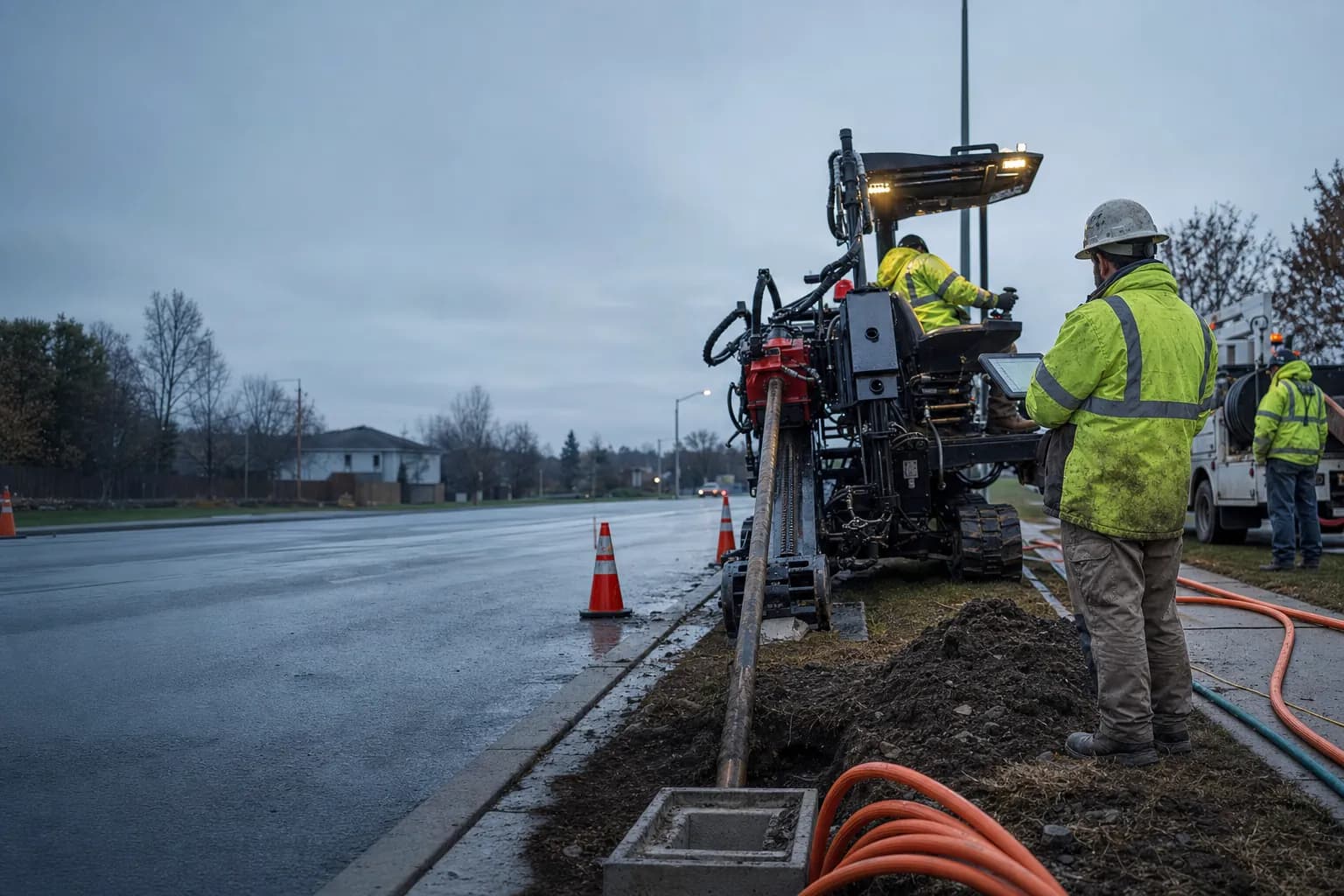
00 /Solutions
Five jobs. One production record.
Everyone in a fiber build handles the same footage, but they need different things from it. Here's how the reporting week changes for each role.
One record for everyone involved
One record from the crew to the project owner.
Underground construction reporting rarely stops with the crew completing the work. A crew lead records the redlines, enters the production into a spreadsheet, sends it to the contractor, and prepares a complete weekly report. The prime contractor then collects production from multiple subcontractors and combines it into a larger report for the project owner.
The same information may be entered, reviewed, corrected, and reorganized several times before it reaches everyone who needs it. Meanwhile, supervisors, office staff, network owners, and the crews completing the next phase still need to know where work has been completed, how much production has been installed, and what remains unfinished.
VORO FiberOps creates one shared production record. Work is recorded directly on the map, attached to the correct run, and made visible to the people responsible for reviewing, managing, reporting, and continuing the project.
Daily production, weekly totals, contractor summaries, project progress, and invoicing can all be generated from the same verified information. Crews enter the work once, while every level of the project sees the information relevant to them.
Record production in the field
Capture completed footage, redlines, dates, crews, materials, and notes directly on the run where the work occurred.
See completed and remaining work
Use the map to understand what has been installed, what is currently active, and what still needs to be completed.
Connect every level of the project
Give subcontractors, prime contractors, project owners, inspectors, and downstream crews access to the same current production information.
Build reports from one record
Generate daily reports, weekly contractor totals, consolidated project reports, and invoice quantities without recreating the same information in multiple spreadsheets.
Fiber Contractors
Combine every crew's week without rebuilding it.
Today: crews text footage, the office re-types it into spreadsheets, Friday is spent combining crews, checking numbers, and building invoice quantities by hand.
With VORO, production is recorded once at the run. Daily footage combines into weekly totals on its own, and approved records carry into invoicing.
What they see
- Production from every crew, by day and by week
- Completed work reviewed against the plan
- Invoice quantities backed by verified records
- A permanent production history per project
Work that goes away
- Re-entering crew footage into spreadsheets
- Rebuilding weekly reports from texts and calls
- Reconciling invoice quantities against reports
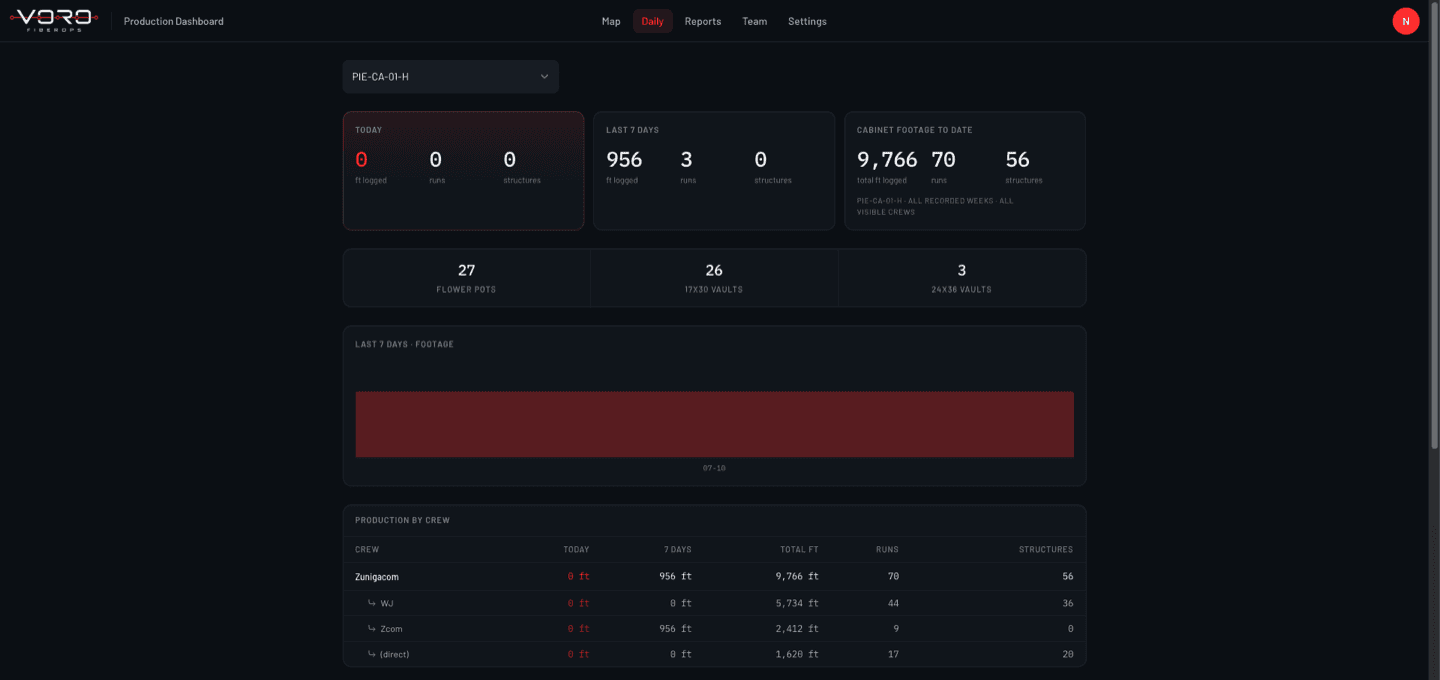
Prime Contractors
Consistent production from every contractor.
Today: each contractor reports differently through PDFs, spreadsheets, and emails, and someone has to normalize it before anyone can compare projects or spot conflicts.
With VORO, reported footage arrives in one format across contractors and projects, duplicates are caught at entry, and documentation accumulates automatically.
What they see
- Production across contractors in one view
- Multiple projects and crews, same format
- Progress without waiting for emailed reports
- Production documentation that builds itself
Work that goes away
- Normalizing every contractor's report format
- Chasing missing or conflicting submissions
- Manual cross-checks between report versions
Production - all contractors
3,362 ft| Crew | Run | Footage | Status |
|---|---|---|---|
| Crew 1 - Plow | HH-089 → HH-090 | 1,120 ft | Verified |
| Crew 2 - Drill | HH-103 → HH-104 | 347 ft | Verified |
| Crew 3 - Drill | HH-116 → HH-117 | 410 ft | Review |
| Crew 4 - Plow | HH-064 → HH-066 | 1,485 ft | Verified |
Supervisors & Owners
See the whole operation before the phone rings.
Today: knowing what every crew completed means calls, texts, and waiting. Missing production shows up at the end of the week, when it's expensive to fix.
With VORO, every crew's completed work is visible daily. Missing days, corrections, and review items surface while the week is still open.
What they see
- What every crew completed, updated daily
- Daily and weekly footage at a glance
- Corrections and notes tracked on the run
- What's ready to report and ready to invoice
Work that goes away
- End-of-day status calls to every crew
- Hunting for missing production on Friday
- Guessing which report version is current
Daily production - Thu, Jul 9
3,362 ft| Crew | Run | Footage | Status |
|---|---|---|---|
| Crew 1 - Plow | HH-089 → HH-090 | 1,120 ft | Verified |
| Crew 2 - Drill | HH-103 → HH-104 | 347 ft | Verified |
| Crew 3 - Drill | HH-116 → HH-117 | 410 ft | Review |
| Crew 4 - Plow | HH-064 → HH-066 | 1,485 ft | Verified |
Field Crews
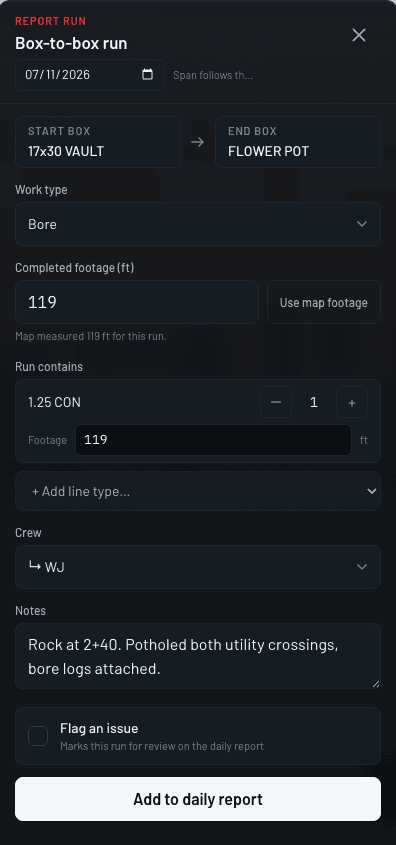
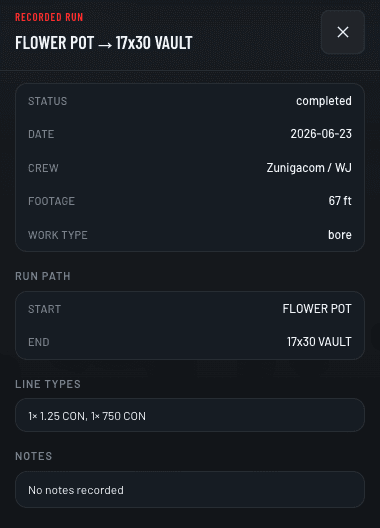
Report the run in the time it takes to load the drill.
Today: crews finish the work, then repeat it with a text to the supervisor, a call to the office, or sometimes a marked-up map photo. Then someone calls back to double-check.
With VORO, the crew picks the run on the map and enters the footage. Minimal fields and no long forms. What's already submitted is visible, so nobody asks twice.
What they see
- A clear, map-based entry process
- Minimal information to enter per run
- What's already been submitted, on the map
- Their own production history
Work that goes away
- End-of-day calls and texts about footage
- Re-reporting the same work to different people
- Filling out long daily report forms
Project Managers
Project progress read from the production record.
Today: progress lives in whichever spreadsheet was updated last. Notes are in inboxes, corrections in threads, and reported quantities need reconciling before every review.
With VORO, production is consistent and filterable by project, plan, crew, and date. Notes and corrections stay attached to the run they describe.
What they see
- Production by project, plan, crew, and date
- Reported quantities in one format
- Notes and corrections in context
- Overall progress from real records
Work that goes away
- Reconciling spreadsheets before reviews
- Searching inboxes for the note about a run
- Manually assembling progress summaries
Invoice
INV-2026-027
Period
Jul 6 – Jul 10
| Item | Qty | Rate | Total |
|---|---|---|---|
| Directional bore - 1×2" HDPE | 8,727 ft | $14.00 | $122,178 |
| Plow - 2×2" HDPE | 6,910 ft | $9.50 | $65,645 |
| Handholes set - 30×48 | 11 | $850.00 | $9,350 |
| Quantities from verified production records | Total | $197,173 | |
Book a demo
Which of these weeks is yours?
Book a demo and walk through your own reporting process. We'll show exactly which steps VORO removes for your role.
No commitment. About 30 minutes.